

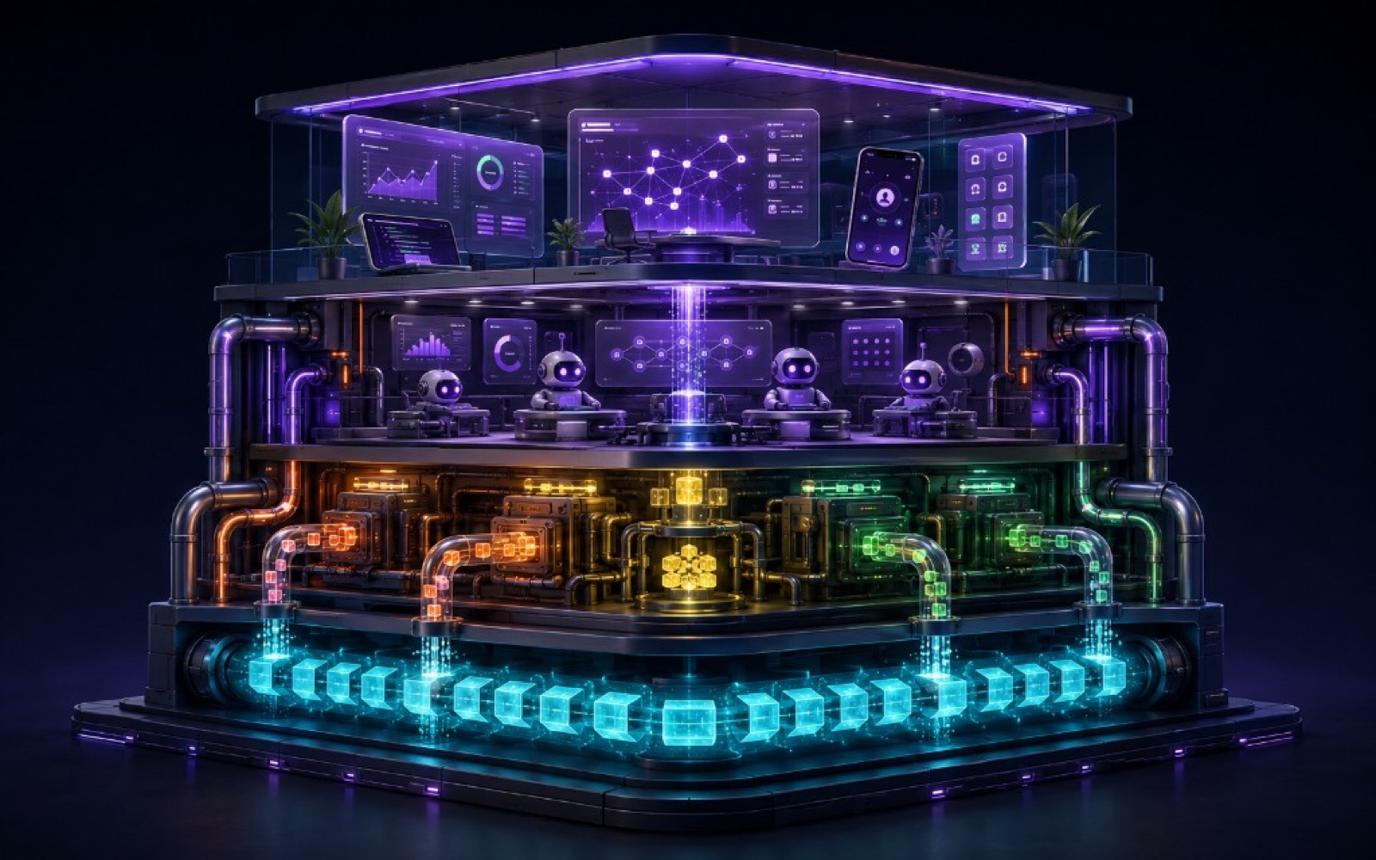


Electric Agents 0.6 is out today. It rounds out the platform we launched in April with a broader SDK and runtime surface for building agentic systems.
- Core APIs. Long-lived entities, StreamDB state, local and remote runners, spawning and forking, wakes, signals, schedules, self-sends, app APIs, and multi-agent coordination patterns.
- Apps in development. Desktop and mobile devtools for inspecting and controlling agent systems. Download canary builds from GitHub releases or build from source.
- Cloud next. Managed Agents servers in Electric Cloud are coming soon.
Get started with Electric Agents
Run the Quickstart, read the docs, or revisit the original launch post.
The Electric Agents stack
The ecosystem is converging on a thesis: the agent is the log. If you accept that, the rest of the stack follows.
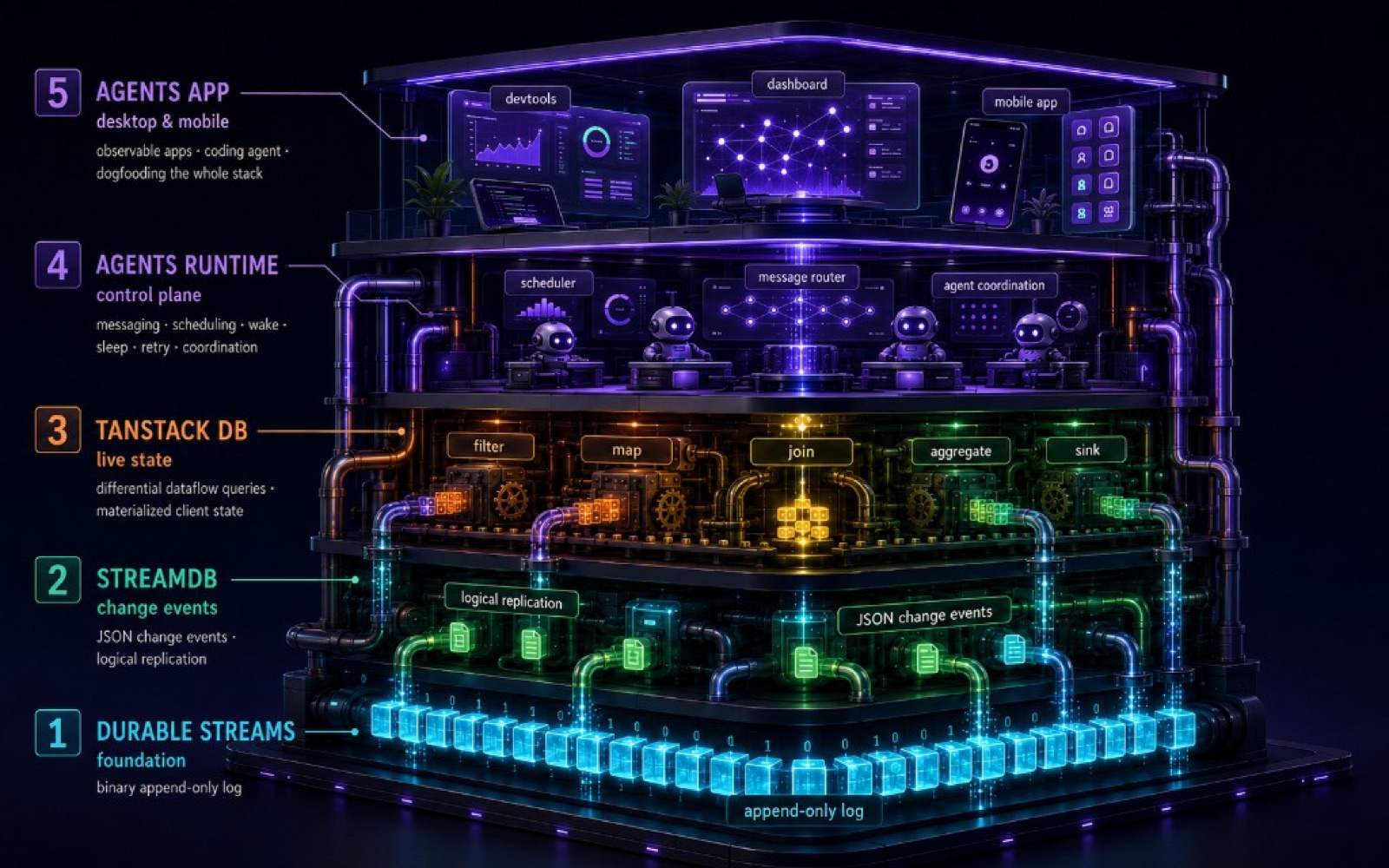
If the agent is the log, the log has to outlive any single process or device — and if multiple readers need to observe it (UIs, supervisors, other agents), it has to sync. Durable Streams are append-only logs that do both.
Raw logs aren't ergonomic. You want typed projections — messages, runs, tool calls, errors, children — that update live as events land. StreamDB projects those collections over the stream.
Projections need queries: filter, join, aggregate for a UI timeline or an agent's context window. TanStack DB is the reactive query layer.
At this point you have durable, syncable, queryable agent state. What's missing is compute. Something has to run the LLM loop, call tools, and write the results back. And something has to track which entities exist, route messages, schedule wakes, and dispatch work. The Agents runtime is that control plane.
Runners do the compute; the runtime coordinates. A runner can live on your laptop, in your infrastructure, in CI, or anywhere you control. Because coordination and compute are separate, you can start a session on your machine, leave the runner there, then open the same session from your phone to send a follow-up or stop it.
Managed Agents servers in Electric Cloud are coming soon — hosted coordination, user-owned compute.
Every entity is a StreamDB
In Electric Agents, the agent is the durable stream, not the process currently handling it.
- An Electric Agents entity is a long-lived, addressable thing: an assistant, worker, coding session, support ticket, lead researcher, orchestrator, monitor, or any agent type you define.
- Every entity has a durable stream, which is the log of what happened.
- Every entity also has a typed StreamDB projection. That projection gives you live state: timeline, inbox, runs, tool calls, context, errors, children, signals, and custom collections.
- The process that handles a wake can come and go. The entity persists. It can sleep, wake, replay, fork, spawn children, and be observed by apps or other agents.
Every agent is fully introspectable. The stream is a complete audit trail — what you see above is the actual data model.
Demos and videos
Logical entities
See how Electric Agents models agents as durable, addressable entities. Each entity is backed by a durable stream and has its own URL, so apps, agents, and runtime APIs can all refer to the same long-lived thing.
Custom entities
Define your own entity types with custom state, handlers, permissions, and tools.
State
Inspect an entity's live StreamDB state: messages, runs, tool calls, child status, and custom collections.
Forking and spawning
Spawning starts a fresh child entity. Forking branches an existing entity from a historical point in its stream, preserving the useful context while opening an alternative path forward.
Child agents
Use child agents to split work into separately owned streams that the parent can observe and coordinate. A spawned child can receive instructions, perform operations, and report back through its own durable state.
Signals
Signals give operators and apps a control plane for active work: SIGINT, pause, resume, kill, and handler-level lifecycle events.
PG sync triggers
Postgres changes can flow through sync and wake an agent when the data it cares about changes.
Send to self
An agent can send itself a future message to sleep now and continue work later.
Cron
Cron schedules wake agents on recurring intervals without keeping a worker process alive.
Core APIs
Define
Define entity types with schemas, handlers, permissions, and tools. This is where you decide what kind of long-lived thing exists in the system, what state it owns, and what code runs when it wakes. SDK
const registry = createEntityRegistry()

registry.define("assistant", {
  description: "A project-aware assistant",
  state: {
    notes: {
      schema: z.object({ id: z.string(), text: z.string() }),
      primaryKey: "id",
    },
  },
  async handler(ctx) {
    // ...
  },
})
Run
Run an agent loop that persists runs, text, reasoning, tool calls, and errors to the entity stream. The handler can do normal application work before or after the LLM loop; ctx.useAgent() and ctx.agent.run() record the agent trace. See writing handlers and configuring the agent loop. Runtime
async handler(ctx) {
  ctx.useAgent({
    systemPrompt: "You are a helpful assistant.",
    model: "claude-sonnet-4-6",
    tools: [...ctx.electricTools, searchDocsTool],
  })

  await ctx.agent.run()
}
Spawn
Spawn a fresh child entity without parent history. Use this for workers, fan-out, and multi-layer agent trees where the parent wants another entity to own a separate stream of work. See spawning and coordinating. SDK
const worker = await ctx.spawn(
  "worker",
  "audit-docs",
  { tools: ["read", "search"] },
  {
    initialMessage: "Audit the docs for missing release notes.",
    wake: { on: "runFinished", includeResponse: true },
  }
)
Fork
Fork an entity with history. Use this when you want a second path through the same session. The fork keeps the useful context and branches the durable stream, so you can try another approach without overwriting the original. See spawning and coordinating. Runtime App
const fork = await ctx.forkSelf("variant-a", {
  initialMessage: { text: "Try the shorter implementation path." },
  tags: { branch: "variant-a" },
})
Send
Send messages to any entity. Because messages are durable inbox entries, the same API works for user input, parent-to-child steering, and send-to-self continuation after a delay. SDK
await ctx.send(
  "/worker/audit-docs",
  { files: ["website/docs/agents/index.md"] },
  { type: "review_request" }
)

await ctx.send(
  ctx.entityUrl,
  { step: "continue-after-indexing" },
  { type: "self", afterMs: 60_000 }
)
Wake
Wake entities from inbox messages, child completion, state changes, cron, future sends, event sources, and Postgres sync triggers. Wakes are how agents scale to zero: no process has to stay alive just to notice that something changed. See waking entities. Runtime
await ctx.observe(entity("/worker/audit-docs"), {
  wake: { on: "runFinished", includeResponse: true },
})

await client.registerWake({
  subscriberUrl: "/monitor/docs",
  sourceUrl: "/worker/audit-docs/main",
  condition: { on: "change", collections: ["runs", "texts"] },
})
Observe
Observe entities, shared state, entity lists, timelines, and child state in real time from handlers or apps. Observing loads the target stream into a typed local DB. Those collections can drive UI, coordination logic, or debugging tools. Use the runtime client and React client APIs. SDK App APIs
const client = createAgentsClient({ baseUrl: "http://localhost:4437" })
const db = await client.observe(entity("/assistant/release-post"))

console.log(db.collections.texts.toArray)
Schedule
Schedule work with cron and future sends. Agents can sleep until the next scheduled wake. Recurring jobs and delayed follow-ups live in the entity's durable manifest, not in an external timer you have to reconcile. Runtime
await client.upsertCronSchedule({
  entityUrl: "/assistant/release-post",
  id: "daily-checkin",
  expression: "0 9 * * *",
  timezone: "Europe/London",
  payload: "Review open launch tasks.",
})

await client.upsertFutureSendSchedule({
  entityUrl: "/assistant/release-post",
  id: "follow-up",
  fireAt: new Date(Date.now() + 60_000).toISOString(),
  payload: "Continue after the preview build finishes.",
})
Signal
Signal running agents: interrupt, pause, resume, kill, or deliver handler-level lifecycle signals. Signals give apps and operators a control plane for active work without treating the agent as an opaque process. See the signals guide and CLI reference. Runtime CLI App
await client.signalEntity({
  entityUrl: "/horton/release-post",
  signal: "SIGINT",
  reason: "User wants to redirect the current run.",
})
Coordinate
Coordinate with shared state and multi-agent patterns such as orchestrator/worker, blackboard, reactive observers, map-reduce, and pipelines. Coordination is explicit state and explicit streams, so parent agents, child agents, and UI clients can inspect the work. SDK
const board = ctx.mkdb("release-board", {
  tasks: {
    schema: z.object({ id: z.string(), status: z.string() }),
    type: "shared:task",
    primaryKey: "id",
  },
})

board.tasks.insert({ id: "screenshots", status: "needed" })

const reviewer = await ctx.spawn("worker", "reviewer", {})
await ctx.observe(entity(reviewer.entityUrl), {
  wake: { on: "change", collections: ["texts"] },
})
Connect
Connect external tools and systems with MCP servers, webhook-source subscriptions, webhooks, and PG sync-driven triggers. Agents can subscribe to operational systems and wake when those systems change. Runtime
await client.subscribeToWebhookSource({
  entityUrl: "/horton/release-post",
  id: "github-pr",
  sourceKey: "github",
  bucketKey: "repo",
  params: { repo: "electric-sql/electric" },
  lifetime: { kind: "until_entity_stopped" },
})

const todos = await client.observe(
  pgSync({ table: "todos", where: "project_id = $1", params: ["agents"] })
)
Inspect
Inspect every entity as a StreamDB: timeline, inbox, runs, tool calls, child status, errors, signals, attachments, and custom collections. The runtime exposes these as TanStack DB collections, so app code can query the agent's state instead of scraping logs. See the built-in collections reference and the TanStack DB query docs. App APIs App
import { eq, queryOnce } from "@durable-streams/state/db"

const db = await client.observe(entity("/horton/release-post"))

const runs = await queryOnce((q) => q.from({ run: db.collections.runs }))

const toolCalls = await queryOnce((q) =>
  q.from({ toolCall: db.collections.toolCalls })
)

const attachments = await queryOnce((q) =>
  q
    .from({ manifest: db.collections.manifests })
    .where(({ manifest }) => eq(manifest.kind, "attachment"))
)
Apps in development
The desktop and mobile apps are built on the same APIs you use: observe(entities()) to list agents, observe(entity(...)) to load one, the runtime client to spawn, signal, and send. The app is a subscriber, not special infrastructure.
We're using them to dogfood the SDK and runtime, and to build toward our own software factory: agents that shepherd PRs and issues, keep work moving, and let everyone connect to the same durable session.
- Custom agent types: build entities with
@electric-ax/agents-runtimeand inspect them in the desktop app. - State explorer: see each entity's runs, inbox, manifests, and custom state in one view.
- Entity timeline: replay a run event by event, then fork from a point in the timeline to try another path.
- Cloud or self-hosted: use Electric Cloud when available, or point the app at an agents-server you run yourself.
- Remote sessions: open sessions started by CI, webhooks, issues, cron, or another machine.
- MCP servers: add MCP servers with native OAuth. Workspace
mcp.jsonfiles are respected. - Model providers: use an API key from your keychain, or sign in to Codex. Anthropic, OpenAI, DeepSeek, and Moonshot are supported.
- Skills and slash commands: use
/quickstartto get started, then save commands for your workflows. - Phone handoff: open a run on iOS or Android to steer it, send a message, or check progress.
- Desktop workflow extras: pick a working directory, split the tile workspace, attach files and screenshots to chat, discover local dev servers, and install the
electricCLI system-wide.
You can download app canaries from GitHub releases, or build the apps yourself from the repo.
How to try it
Run the quickstart from the CLI:
npx electric-ax agents quickstartOpen the UI, spawn Horton, send a message, and watch the timeline update as the agent thinks, calls tools, and responds.
Then define your own entity type and connect it to the same runtime and apps:
import {
  createEntityRegistry,
  createRuntimeHandler,
} from "@electric-ax/agents-runtime"

const registry = createEntityRegistry()

registry.define("assistant", {
  description: "A general-purpose AI assistant",
  async handler(ctx) {
    ctx.useAgent({
      systemPrompt: "You are a helpful assistant.",
      model: "claude-sonnet-4-6",
      tools: [...ctx.electricTools],
    })

    await ctx.agent.run()
  },
})

export const runtime = createRuntimeHandler({
  baseUrl: process.env.ELECTRIC_AGENTS_URL ?? "http://localhost:4437",
  serveEndpoint: "http://localhost:3000/webhook",
  registry,
})
Once registered, assistant appears as an entity type in the app. Spawn /assistant/my-agent, send it a message, and use the same timeline, state, and devtools surfaces that Horton uses.
Coming next
- Managed Agents servers in Electric Cloud.
- More examples and docs for app builders: PG sync triggers, webhook sources, MCP, attachments, sandbox profiles, and multi-agent patterns.
- More app development polish: desktop builds, smoother downloads and updates, and richer mobile distribution.
Next steps
- Run
npx electric-ax agents quickstart. - Read the Electric Agents docs.
- Watch the demos in this post.
- Download app canaries from GitHub releases, or build them from source.
- Join the Electric Discord and tell us what you build.