

Usage
Electric Cloud is the hosted, fully-managed platform for Electric Streams and Electric Sync. Sign up, provision a service, and you get a globally distributed sync endpoint backed by our Data Delivery Network — without running any of the infrastructure yourself.
This page covers how to get up and running:
- creating a workspace
- provisioning Electric Sync sources and Electric Streams services
- making API requests
- securing access with an auth proxy
For the command-line equivalent of everything below, see the CLI reference.
Workspaces and projects
Electric Cloud organises resources into workspaces (your team or org), projects (one per app or product), environments (e.g. production, staging, per-PR previews), and services (an Electric Sync source or an Electric Streams server).
After signing in to the dashboard, create a workspace and a project, then provision the services you need inside an environment.
Electric Sync: provision a source
Electric Sync connects to your Postgres database, consumes changes over logical replication, and serves them as cacheable HTTP shapes.
- Open the dashboard and click New Source.
- Pick a region, project and environment, and paste your PostgreSQL connection string.
- Click Connect source to register your database.
Once connected you should see your source details, similar to:
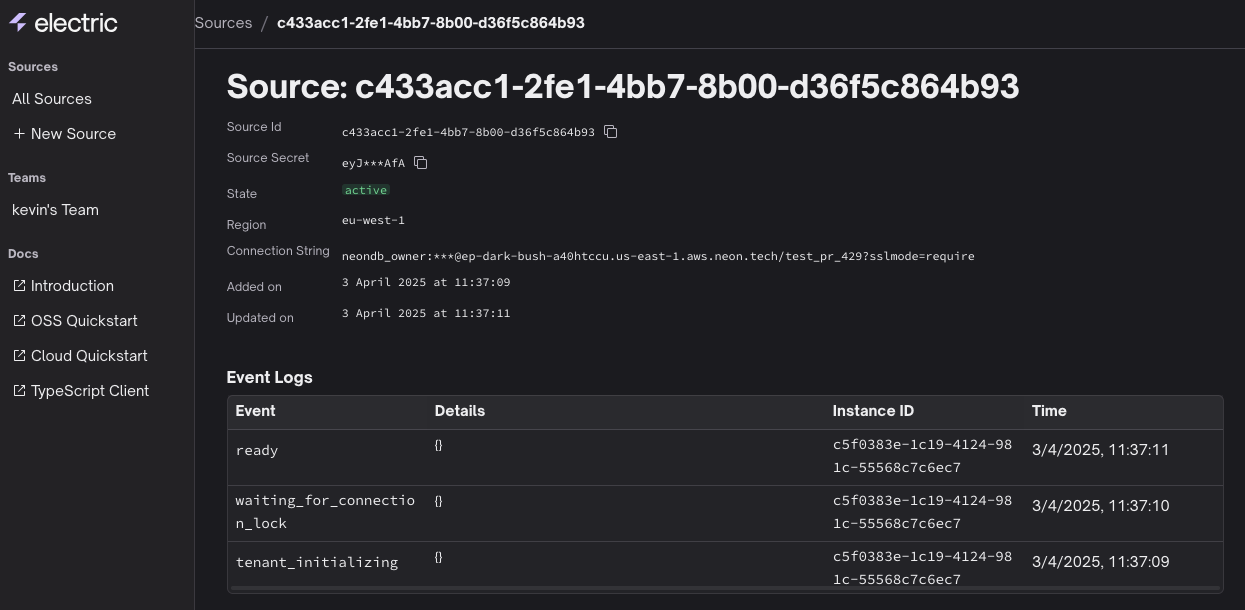
When the source state is active, you can start making API requests against it.
Your Postgres needs to be reachable from Electric Cloud and configured for logical replication. See the Sync deployment guide and PostgreSQL permissions guide for details.
Electric Streams: provision a service
Electric Streams is a fully-managed implementation of the open Durable Streams protocol — durable, append-only, replayable HTTP streams for events, agent loops and real-time data.
To provision a Streams service, open the dashboard, pick a project and environment, and create a new Streams service. You'll receive a base URL and a service secret.
From there, you can POST events to a stream and GET from any offset. See the Streams quickstart and the Streams overview for the protocol concepts.
Making API requests
Electric Sync
To request a shape, make an HTTP request to your source's shape endpoint. Don't forget to include the source credentials — you can find them in the dashboard, or fetch them from the CLI:
export SOURCE_ID="8ea4e5fb-9217-4ca6-80b7-0a97581c4c10"
export SECRET="<long secret value>"

export SHAPE_DEFINITION="table=items&offset=-1"

curl -i "https://api.electric-sql.cloud/v1/shape?$SHAPE_DEFINITION\
    &source_id=$SOURCE_ID\
    &secret=$SECRET"
See the HTTP API reference for the full request/response format and the shapes guide for how to filter and partition data.
Electric Streams
To read or append to a stream, point the Streams client at your service URL with the stream name and credentials. See the Streams quickstart for end-to-end examples.
Security model
Each service has an ID and a secret:
- The service ID uniquely identifies the resource.
- The service secret is a token that grants access to it. Treat it as you would your database password.
Do not use service secrets in the client!
If you embed a secret in client-side code, you expose it to malicious users, who can then connect directly to your service.
See the security guide for more context.
Proxy auth
The recommended pattern for secure use of Electric Cloud is to inject the service ID and secret in the origin request made by your auth proxy or API. You can proxy through an edge worker, an API route, or your existing backend — see Local-first sync with your existing API.
Example
In your client, request the shape as normal, without the source_id and secret parameters. For example using the Sync TypeScript client:
import { ShapeStream } from '@electric-sql/client'

const stream = new ShapeStream({
  url: `https://your-api-or-proxy.example.com/v1/shape`,
  params: {
    table: `items`,
  },
})
Then add the source ID and secret to the origin request in your auth proxy. For example using a Next.js Route Handler:
export async function GET(req: Request) {
  const proxyUrl = new URL(req.url)

  // ... validate and authorize the request ...

  // Construct the origin URL.
  const originUrl = new URL(`/v1/shape`, `https://api.electric-sql.cloud`)
  proxyUrl.searchParams.forEach((value, key) => {
    originUrl.searchParams.set(key, value)
  })

  // Add the source params.
  originUrl.searchParams.set(`source_id`, process.env.SOURCE_ID)
  originUrl.searchParams.set(`secret`, process.env.SOURCE_SECRET)

  // Proxy the authorised request on to Electric Cloud.
  const response = await fetch(originUrl)

  // Fetch decompresses the body but doesn't remove the
  // content-encoding & content-length headers which would
  // break decoding in the browser.
  //
  // See https://github.com/whatwg/fetch/issues/1729
  const headers = new Headers(response.headers)
  headers.delete(`content-encoding`)
  headers.delete(`content-length`)

  return new Response(response.body, {
    status: response.status,
    statusText: response.statusText,
    headers,
  })
}
The same proxy pattern applies to Electric Streams — inject the service secret in your proxy, never in the client.
Operations
Per-PR environments
Electric Cloud environments are cheap to spin up and tear down, which makes them a natural fit for per-PR preview deployments. The CLI ships with first-class support for this in CI/CD pipelines.
Observability
Each service exposes metrics and logs in the dashboard. For deeper introspection see the telemetry reference.
Pricing
Electric Cloud has a generous free tier and usage-based paid plans. See the pricing page for plans, limits and usage details.
Support
Got questions? We're happy to help. Ask on Discord or email sales@electric-sql.com.